Things You Need to Know Before Learning React.js
Don't skip the foundation. Here are the JavaScript concepts you should master before jumping into React.


Don't Skip the Foundation
Here's the thing — don't jump to a library or framework when you're learning a new language. In the beginning, the effect is not that much. You'll be thinking you're doing the right thing and you'll feel like you're on track. But the road is long, and the bigger the project gets, the more you'll realize that skipping foundations will make it harder to keep up with bigger projects or new updated concepts.
This is exactly the same with React.js. A lot of beginners jump straight into React without truly understanding JavaScript and its core fundamental concepts. And that's a mistake.
React is just JavaScript. It's a library built on top of it. If you don't understand the language underneath, you'll always feel like you're fighting the framework instead of working with it.
So before you write your first useState, let's make sure you've got these concepts down.
var, let, and const
These are the three ways to declare variables in JavaScript. Simple, right? But a lot of people still mix them up.
var is the old way. It's function-scoped and can be redeclared. Most of the time, you should avoid it.
let is block-scoped and can be reassigned but not redeclared in the same scope. Use this when you know the value will change.
const is also block-scoped, but once you assign a value, you can't reassign it. Use this as your default.
var name = "Ye Min Aung"; // function-scoped, can be redeclared
let age = 23; // block-scoped, can be reassigned
const country = "Myanmar"; // block-scoped, cannot be reassigned

age = 24; // ✅ this works
// country = "Japan" // ❌ this will throw an error
Quick rule of thumb: always start with const. Only use let when you know you need to reassign. Forget var exists.
Object Destructuring
Imagine you have an object and you need to pull out specific values. Without destructuring, you'd do this:
const user = { name: "Ye Min Aung", age: 24, role: "Developer" };

const name = user.name;
const role = user.role;
That works, but it's verbose. Object destructuring lets you do the same thing in one line:
const user = { name: "Ye Min Aung", age: 24, role: "Developer" };

const { name, role } = user;
console.log(name); // "Ye Min Aung"
console.log(role); // "Developer"
You can also rename variables and set default values:
const { name: userName, country = "Myanmar" } = user;
console.log(userName); // "Ye Min Aung"
console.log(country); // "Myanmar" (default, since it doesn't exist on user)
This comes up all the time in React, especially when dealing with props.
Array Destructuring
Same idea, but for arrays. Instead of accessing elements by index:
const colors = ["red", "green", "blue"];

const first = colors[0];
const second = colors[1];
You can destructure like this:
const colors = ["red", "green", "blue"];

const [first, second, third] = colors;
console.log(first); // "red"
console.log(second); // "green"
console.log(third); // "blue"
You can skip elements using commas:
const [first, , third] = colors;
console.log(third); // "blue"
This is super useful when working with hooks in React. useState returns an array, and you'll destructure it every single time:
const [count, setCount] = useState(0);If you don't understand array destructuring, that line will confuse you.
map, filter, and reduce
These three array methods are the backbone of working with data in JavaScript — and in React. You'll use them constantly.
map
map transforms each element in an array and returns a new array. In React, you use this to render lists:
const names = ["Ye", "Min", "Aung"];

const greetings = names.map((name) => `Hello, ${name}!`);
console.log(greetings);
// ["Hello, Ye!", "Hello, Min!", "Hello, Aung!"]
In React, it looks something like this:
{
	names.map((name) => <p key={name}>{name}</p>);
}
filter
filter keeps only the elements that pass a condition:
const scores = [85, 42, 93, 67, 71, 55];

const passing = scores.filter((score) => score >= 70);
console.log(passing); // [85, 93, 71]
Think of it as a gatekeeper — only things that meet the condition get through.
reduce
reduce is the Swiss Army knife. It boils an array down to a single value:
const prices = [1200, 800, 3500, 450];

const total = prices.reduce((accumulator, current) => {
	return accumulator + current;
}, 0);

console.log(total); // 6000
The 0 is the starting value of the accumulator. Each iteration adds the current element to it.
You can combine all three in a real-world scenario:
const products = [
	{ name: "Laptop", price: 1200, inStock: true },
	{ name: "Mouse", price: 800, inStock: false },
	{ name: "Keyboard", price: 3500, inStock: true },
	{ name: "USB Cable", price: 450, inStock: true },
];

// Get names of in-stock products, formatted as strings
const available = products
	.filter((p) => p.inStock)
	.map((p) => `${p.name} - ${p.price} MMK`);

console.log(available);
// ["Laptop - 1200 MMK", "Keyboard - 3500 MMK", "USB Cable - 450 MMK"]
Arrow Functions and Anonymous Functions
Before ES6, functions looked like this:
function greet(name) {
	return `Hello, ${name}!`;
}
Arrow functions are shorter and cleaner:
const greet = (name) => `Hello, ${name}!`;If the function body is a single expression, you can skip the curly braces and the return keyword. It implicitly returns.
Anonymous functions are functions without a name. They're used when you pass a function as an argument:
const numbers = [1, 2, 3, 4, 5];

// The function inside map is anonymous
const doubled = numbers.map(function (num) {
	return num * 2;
});

// Same thing, but with an arrow function (cleaner)
const doubledAgain = numbers.map((num) => num * 2);
In React, you'll write anonymous arrow functions all the time — in event handlers, in map, in setTimeout, everywhere:
<button onClick={() => console.log("Clicked!")}>Click me</button>Template Literals
Forget string concatenation with +. Template literals use backticks and ${} to embed expressions:
const name = "Ye Min Aung";
const age = 25;

// Old way
const old = "My name is " + name + " and I am " + age + " years old.";

// Template literals
const modern = `My name is ${name} and I am ${age} years old.`;
You can put any expression inside ${} — calculations, function calls, ternaries:
const price = 1500;
const message = `Total: ${price > 1000 ? "Expensive" : "Affordable"}`;
Spread and Rest Operators
Both use ..., but they do different things depending on the context.
Spread Operator
Spreads elements out. Useful for copying arrays/objects and merging them:
const frontTech = ["HTML", "CSS"];
const jsTech = ["JavaScript", "TypeScript"];

const allTech = [...frontTech, ...jsTech];
console.log(allTech); // ["HTML", "CSS", "JavaScript", "TypeScript"]
With objects:
const defaults = { theme: "dark", lang: "en" };
const userSettings = { lang: "my" };

const config = { ...defaults, ...userSettings };
console.log(config); // { theme: "dark", lang: "my" }
Notice lang got overwritten because userSettings came last.
Rest Operator
Gathers remaining elements into an array:
const [first, ...rest] = [10, 20, 30, 40];
console.log(first); // 10
console.log(rest); // [20, 30, 40]
In functions:
function sum(...numbers) {
	return numbers.reduce((acc, num) => acc + num, 0);
}

console.log(sum(10, 20, 30)); // 60
Optional Chaining and Nullish Coalescing
These two ES2020 features save you from writing ugly null checks.
Optional Chaining (?.)
Access nested properties without worrying if something is null or undefined:
const user = {
	name: "Ye Min Aung",
	address: {
		city: "Mandalay",
	},
};

console.log(user.address?.city); // "Mandalay"
console.log(user.contact?.phone); // undefined (no error!)
Without ?., that second line would throw Cannot read property 'phone' of undefined.
Nullish Coalescing (??)
Provides a fallback only when the value is null or undefined (not for "" or 0):
const username = ""; // or null, or undefined

const display = username ?? "Anonymous";
console.log(display); // "Anonymous" (because "" is not nullish, it returns "")
Wait — actually, "" is not null or undefined, so ?? returns "". If you want to fallback on empty strings too, use ||:
const display = username || "Anonymous";Know the difference. ?? is more precise.
The Browser DOM
DOM stands for Document Object Model. It's how the browser represents your HTML as a tree of objects that JavaScript can talk to.
You don't need to master the DOM to use React — in fact, React manages the DOM for you. But understanding the basics helps you understand what React is doing behind the scenes.
// Select an element
const heading = document.querySelector("h1");

// Change its text
heading.textContent = "Hello from JavaScript!";

// Change its style
heading.style.color = "blue";

// Add a class
heading.classList.add("highlight");

// Create and append a new element
const paragraph = document.createElement("p");
paragraph.textContent = "I was added by JavaScript!";
document.body.appendChild(paragraph);
Why does this matter for React? Because React uses something called the Virtual DOM. Instead of directly manipulating the real DOM (which is slow), React keeps a copy in memory, figures out what changed, and updates only the parts that need to change. Understanding the real DOM helps you appreciate why React works the way it does.
async/await
If you've ever fetched data from an API, you've dealt with asynchronous code. JavaScript is single-threaded, but it handles async operations using the event loop.
async/await is the modern way to handle promises. It makes asynchronous code look and feel like regular synchronous code:
// Without async/await — promise chaining
fetch("https://jsonplaceholder.typicode.com/users/1")
	.then((response) => response.json())
	.then((user) => console.log(user.name))
	.catch((error) => console.error(error));

// With async/await — cleaner and easier to read
async function getUser() {
	try {
		const response = await fetch(
			"https://jsonplaceholder.typicode.com/users/1",
		);
		const user = await response.json();
		console.log(user.name);
	} catch (error) {
		console.error(error);
	}
}

getUser();
Rules:
awaitcan only be used inside anasyncfunctionasyncfunctions always return a promise- Use
try/catchfor error handling
Here's a more practical example — fetching blog posts:
async function getPosts() {
	const response = await fetch("https://jsonplaceholder.typicode.com/posts");
	const posts = await response.json();

	const titles = posts.slice(0, 5).map((post) => post.title);
	console.log(titles);
}

getPosts();
In React, you'll use this pattern in useEffect or inside event handlers to fetch data.
NPM and Node.js
Two tools you'll encounter immediately, and they're not the same thing.
Node.js
Node.js is a runtime that lets you run JavaScript outside the browser. That means you can run JavaScript on your computer, on a server, anywhere. React development requires Node.js installed on your machine.
# Check if Node.js is installed
node --version
NPM
NPM (Node Package Manager) comes bundled with Node.js. It's how you install third-party packages — libraries and tools that other developers have built and shared.
# Install a package
npm install react

# Install a dev dependency
npm install --save-dev eslint

# Install a specific version
npm install react@18.2.0
When you run npm install, it reads your package.json file and downloads everything into a node_modules folder. Never edit node_modules manually and never commit it to git (add it to .gitignore).
package.json is your project's identity. It tracks:
- Project name and version
- Dependencies (what your project needs)
- Scripts (commands you can run)
{
	"name": "my-react-app",
	"version": "1.0.0",
	"scripts": {
		"dev": "vite",
		"build": "vite build"
	},
	"dependencies": {
		"react": "^19.0.0",
		"react-dom": "^19.0.0"
	}
}
You can also use pnpm or yarn as alternatives to npm. They do the same job but faster and with better disk efficiency.
Putting It All Together
These concepts aren't just theory. They show up in every React project:
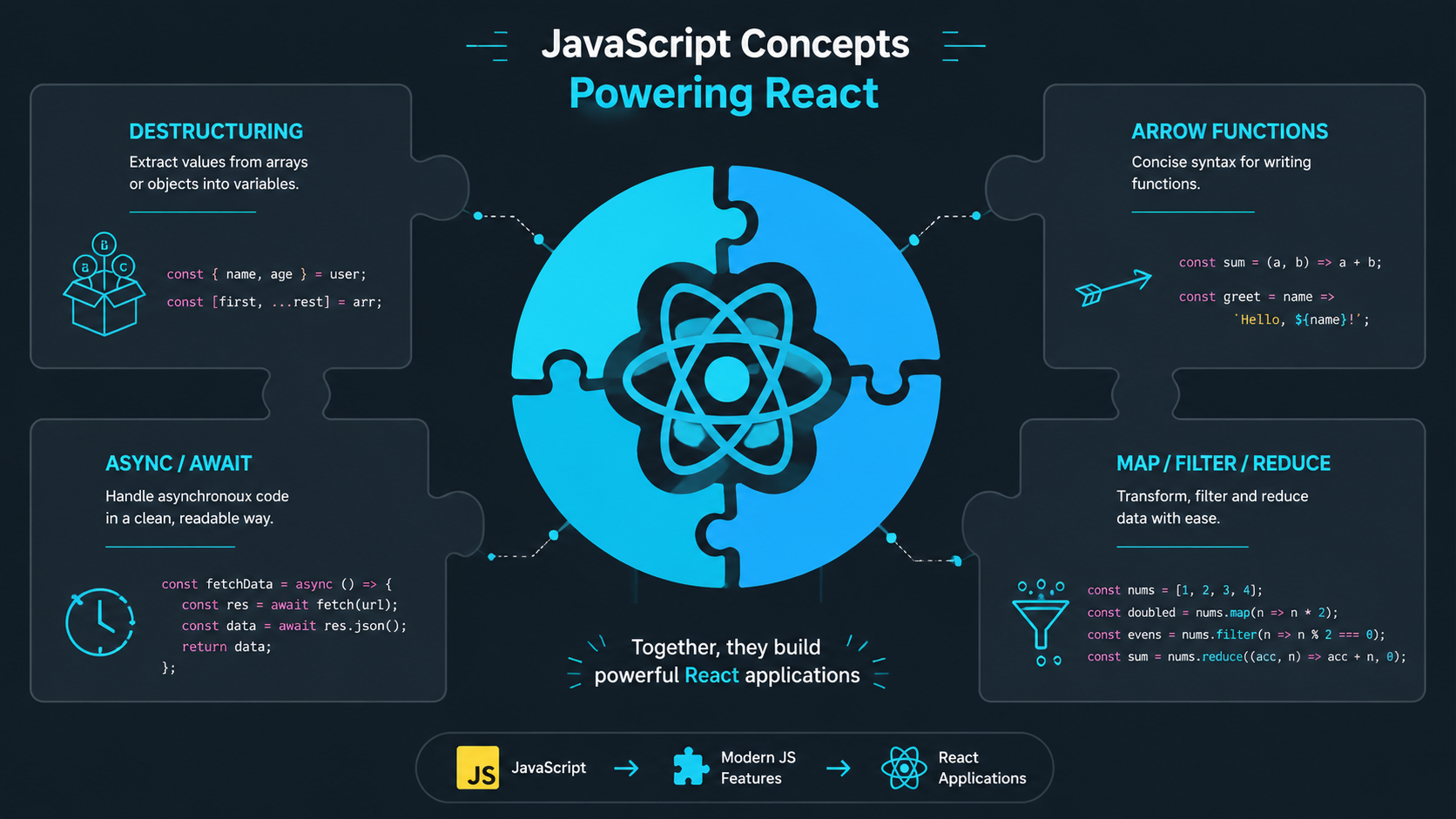
| Concept | Where You'll See It in React |
|---|---|
const / let | Declaring variables, state |
| Destructuring | Props, useState, hooks |
map | Rendering lists of components |
filter | Filtering data before display |
| Arrow functions | Event handlers, callbacks |
| Template literals | Dynamic text in JSX |
| Spread operator | Passing props, merging state |
async/await | Fetching data in useEffect |
| Optional chaining | Safely accessing nested props |
What's Next
Once you're comfortable with all of these, then you're ready for React. You'll pick it up much faster because the syntax won't be new — you'll already understand the JavaScript underneath.
Don't rush the foundation. The road is long, but every concept you master now will save you hours of confusion later. React is just a tool — JavaScript is the skill.
Stay tuned. Thanks for reading!